

User guide Services and CV
Services and your CV
Services keeps your university's portals and forms in one place, with your own notes on how to use each. Your CV is a clean one-page résumé that fills itself from your records.
Services
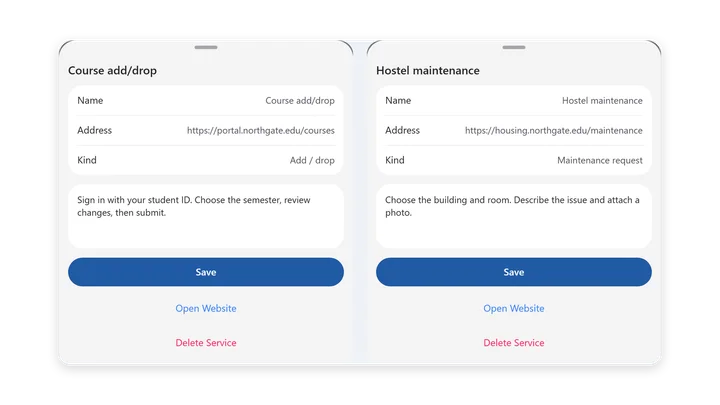
Add Services to the rail in Settings → Sidebar items, or open it from Settings. On phones it's in Settings under Study pages.
- Tap Add Service.
- Give it a Name and its web Address.
- Choose a Kind: Maintenance request, Add / drop, Retake, Leave of absence or Custom.
- Under Steps, write down where to log in and what to pick, so you don't have to work it out next time.
Open Website opens it in your browser. Each service can be edited, or removed with Delete Service.
Your CV
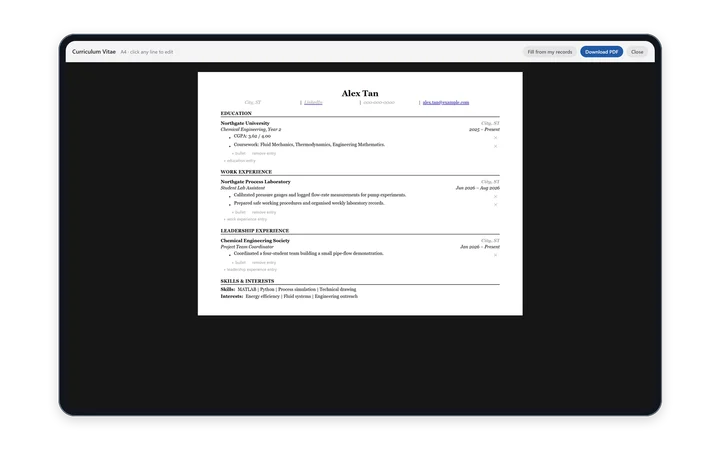
Open it from the Your CV box on Home. It's one page with a fixed, clean layout: you change the words, and the layout looks after itself.
Sections
Header, Education, Work Experience, Leadership Experience and Skills & Interests.
Edit it
- Click or tap any line to edit it. The A4 preview updates as you type.
- Each entry has Organization, Role, City, Dates and bullet points. Write bullets as an action verb, what you did, and the number it moved.
- + bullet adds a point, and remove entry deletes an entry.
Fill it in for you
- Fill from my records adds your name, university, major, CGPA and coursework from your Profile and Roadmap. It doesn't use the AI or any AI actions.
- Ask the Concierge to add an entry: describe a job, club or project and it writes measurable bullet points. Or tell it your skills. See The Concierge.
Download it
Tap Download PDF to save it, ready to send.
Your CV syncs to your other signed-in devices.
Something wrong or missing on this page? Email support@polynotes.me.